Email Marketing ROI (Return on Investment) is the percentage of net profit generated from your email campaigns relative to their total cost. The standard formula is (Attributed Revenue – Total Cost) / Total Cost * 100. However, a “True” ROI calculation must deduct hidden expenses like software subscriptions, personnel hours, and data maintenance—not just the campaign budget.
The Math is Easy. The Attribution is the Lie.
I have audited hundreds of marketing accounts, and I have learned one uncomfortable truth:
Your Email Service Provider (ESP) is lying to you.
Not maliciously, but structurally. Platforms like Klaviyo, HubSpot, or ActiveCampaign are designed to be your cheerleaders. They use generous attribution windows (often claiming credit for a sale just because a user opened an email 29 days ago). Meanwhile, your CFO is looking at the bank account and asking why the cash flow doesn’t match the dashboard.
If you are just copying the “Total Revenue” figure from your email tool and pasting it into an Excel sheet, you aren’t calculating ROI. You are writing fiction.
To get the real number—the one you can take to the bank—you need to strip away the vanity metrics and account for the “Silent Costs” that most formulas ignore.
Here is how we calculate Net Email ROI at Leadoom Digital.
The Real Email Marketing ROI Formula (Beyond the Basics)
Most blogs stop at (Sales – Spend) / Spend. That is fine for a lemonade stand, but it is dangerous for a SaaS or E-commerce business in 2026. You need to calculate Net Email ROI.
Here is the formula we actually use:
Email Marketing ROI Formula = Attributed Revenue – (Software Cost + Personnel + Total Email Marketing Costs + Data Ops)/Total Email Marketing Cost x100
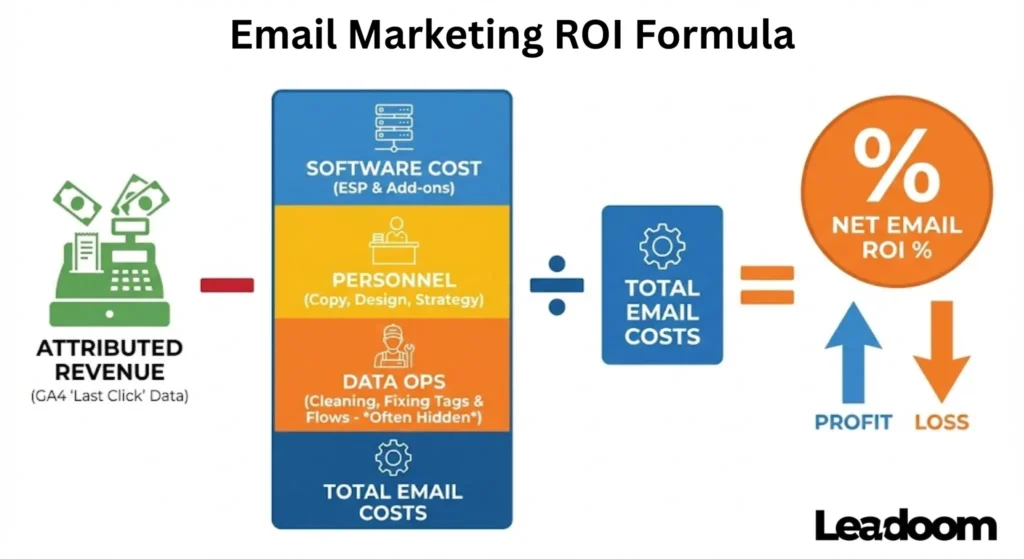
Why “Data Ops” Matters
We frequently see businesses budget for the “Seat” (the ActiveCampaign subscription) and the “Hands” (the copywriter). They almost always forget the “Cost of Context.”
If you buy a Ferrari (a Tier 1 ESP) but drive it like a Go-Kart (batch-and-blast), you are burning cash. The real hidden cost is the Operations/Technician hours required to keep your data clean. If your CRM “talks” to your ESP but the tags don’t fire, you pay someone to fix that plumbing. We factor in at least 5–10 hours of “Data Maintenance” monthly for mid-sized lists.
Calculating Your “Total Cost” (Step-by-Step)
To get an honest number, you must tally every expense. If you skip lines here, your ROI will look artificially high.
|
Cost Category |
What to Include |
Typical Monthly Estimate (SMB) |
|---|---|---|
|
ESP Subscription |
Your monthly fee for ActiveCampaign, HubSpot, etc. |
$200 – $800 |
|
Content Creation |
Copywriting, Design, Graphics (Internal or Freelance). |
$1,000 – $3,000 |
|
Data Hygiene |
List cleaning tools (e.g., NeverBounce), Tech troubleshooting. |
$150 – $500 |
|
Add-ons |
Countdowns, personalized image tools, dedicated IPs. |
$50 – $200 |
Hard Truth: If you spend $500 on software and $2,000 on a writer, but your “Data Ops” (fixing broken flows) costs you $1,000 in billable hours, your total cost is $3,500, not $2,500.
Email Marketing ROI Calculator
Stop doing back-of-the-napkin math. We built this calculator to give you an instant, honest read on your campaign performance.
How to use this tool:
- Send Volume: Enter the total number of emails sent (not just opens).
- Total Cost: Be honest here. Include your software fees + the estimated hours you paid a freelancer or employee to write it.
- Attributed Revenue: Use the number from GA4 (Last Non-Direct Click), not your ESP’s dashboard, for the most conservative and accurate result.
Calculate your Email ROI
Results
Understanding Your Score
Once the numbers crunch, you will likely see one of three scenarios. Here is how to interpret them without panicking:
- Negative ROI (Red): You are losing money on every send. This is rarely a content problem; it is usually a List Quality problem. You are paying for "ghosts." Go back to Step 1 (The Dead Weight Purge) immediately to cut your costs.
- 0% to 100% ROI: You are breaking even or making a slight profit. In B2B, this is actually fine if your backend "Lifetime Value" is high. In E-commerce, this is the "Danger Zone"—you need to optimize your offer.
- 400%+ ROI: You are in the "Green Zone." You have product-market fit. Your next move is not to change the email, but to scale the traffic (Paid Ads) feeding into this funnel.
Average Email Marketing ROI: The Benchmark
If you are looking for a single number to paste into a slide deck, here it is: The global average ROI for email marketing is roughly $36 to $40 for every $1 spent.
However, relying on a global average is dangerous. It is like saying the "average" human has one testicle. It is statistically true, but biologically useless for the individual.
The "Average" is heavily skewed by massive e-commerce giants who send millions of emails with near-zero marginal cost. Your specific target depends entirely on your business model.
The "Real" Averages by Model (2026 Data)
- High-Volume B2C (E-commerce/Retail):
- Target: 45:1 ($45 return on $1 spend).
- Why: Low production costs, high frequency, and impulse purchases drive this number up.
- High-Ticket B2B (SaaS/Consulting):
- Target: 30:1 ($30 return on $1 spend).
- Why: Sales cycles are longer (3–6 months). You spend more on content creation and strategy. The ROI is lower in percentage but significantly higher in absolute dollar value per conversion.
- Media & Publishing:
- Target: N/A (Metric is CPM/Ad Revenue).
- Why: The email is the product. ROI is calculated based on advertiser spend vs. list maintenance costs.
Leadoom Insight: If you are a B2B company and you are panicking because you aren't hitting the "40:1" average, stop. You are likely measuring success based on immediate sales rather than Pipeline Velocity. A single B2B contract worth $50,000 justifies a lot of "low ROI" months.
Factors that Affect Email Marketing ROI
It is easy to blame the copywriter when sales are down, but in my experience, ROI is usually dictated by infrastructure, not adjectives. There are four "levers" that physically move the needle on your returns.
1. Domain Reputation (The Invisible Ceiling)
You can write the best email in the world, but if Gmail creates a "Spam" flag because your DKIM/DMARC records are loose, your ROI is zero.
- The Reality: In 2026, mailbox providers (Google, Yahoo) are stricter than ever. If your domain reputation dips, your deliverability throttles.
- The Metric: Check your "Google Postmaster Tools." If your domain health is "Low" or "Bad," you are shouting into a void.
2. List Hygiene vs. List Size
I would rather have 5,000 active subscribers than 50,000 "ghosts."
- The Cost: Remember, most ESPs (like ActiveCampaign or HubSpot) charge by the contact count. If 30% of your list hasn't opened an email in 6 months, they are actively dragging your ROI down by increasing your monthly bill while generating $0 revenue.
3. The "Post-Click" Experience
This is the most ignored factor. Email marketing’s job is to get the click. The website’s job is to get the sale.
- Where it breaks: If your email promises a "20% Discount on Winter Coats" but links to a generic "All Products" collection page, you create friction. Users bounce, and your Email ROI tanks—not because the email failed, but because the landing page did.
4. Segmentation Depth
Batch-and-blast is dead. Sending the same message to a CEO and a Junior Associate kills engagement. Factors like purchase history, browsing behavior, and lead scoring allow you to send relevant offers. Relevance equals revenue.
The Attribution Headache: ESP vs. GA4
This is where most people get stuck. You will likely see two different revenue numbers for the same campaign.
- The ESP (The Greedy Narrator): ActiveCampaign wants to prove its worth. It often uses a "Last Touch" or generous attribution window. If someone opens an email, waits two weeks, and buys, the ESP claims the sale.
- GA4 (The Stingy Accountant): Google Analytics 4 defaults to "Last Non-Direct Click." If a user clicks your email, browses, leaves, and returns later via a Google Search to buy, GA4 gives credit to Search.
The Discrepancy Gap
In our own audits, we frequently see a 20–40% discrepancy between these two sources.
What We Do:
Always trust the Click (GA4) over the View/Open (ESP). Since Apple introduced Mail Privacy Protection (MPP), "Opens" have become a vanity metric. If your attribution model relies on "View-through" revenue, your ESP is hallucinating data.
Why Your Email Marketing ROI is Underperforming
If your numbers are in the red, it is rarely bad luck. It is usually a broken system. After auditing dozens of accounts, I consistently find the same three culprits destroying value.
1. You Are in the "Promo Tab" Dungeon
If your open rates have slowly bled out from 25% down to 12%, you haven't lost your touch—you’ve likely lost the inbox.
- The Cause: Over-using "salesy" HTML templates, too many images, or trigger words (FREE, BUY NOW) in the subject line.
- The Fix: Switch to "Plain Text" or hybrid emails. They look like a personal letter from a friend, not a flyer from a corporation.
2. The "Ask" Doesn't Match the "Temperature"
You are asking for marriage on the first date.
- The Mistake: Pitching a $2,000 product to a lead who just downloaded a free checklist yesterday.
- The Consequence: High unsubscribe rates. You are burning list equity faster than you can build it. You need a "Nurture Bridge"—a sequence of 3-5 value-based emails—before asking for the sale.
3. Your Attribution is Broken (False Negatives)
As we discussed regarding GA4, you might actually be making money, but you can't see it.
- Scenario: A user reads your email on their phone (iPhone) but buys later on their laptop (Chrome).
- The Error: Cross-device tracking fails. Your email looks like it generated $0.
The Solution: Use unique coupon codes in emails (e.g., EMAIL20). When that code is used at checkout, no matter the device, the revenue is 100% attributable to email.
How to Improve Your Email Marketing ROI: Step-by-Step Guide
You don't need to rewrite your entire strategy. You need to tighten the bolts. Here is the exact cleanup process I use for clients.
Step 1: The "Dead Weight" Purge
Stop paying for people who don't care.
- Log into your ESP.
- Create a segment: Has not opened in 180 days AND Date added is before 180 days ago.
- The Hard Part: Delete them.
- Result: Your open rates will instantly skyrocket (improving domain rep), and your monthly software bill will drop. Instant ROI increase.
Step 2: Implement the "Sunset" Policy
Don't wait for a manual purge. Automate it. Most marketers send desperate "We miss you!" emails. Those don’t work. The best approach is the "Break-Up" method.
Subject: Should I delete your file?
Hi [First Name],
I’m cleaning up my database this week.
I noticed you haven't opened my emails in a few months. That is totally fine—inboxes get crowded, and priorities change. I don't want to clutter your inbox if this topic isn't relevant to you anymore.
However, because I pay for every subscriber on this list, I try to keep it limited to people who actually want to be here.
So, here is the deal:
- If you want to stay: [Click here to keep receiving updates].
- If you want to leave: You don't need to do anything. I will automatically unsubscribe you in 48 hours.
No hard feelings either way. Just want to make sure I'm not annoying you.
Cheers,
[Your Name]
Step 3: Use "Behavioral" Triggers
Stop guessing what they want. Watch what they do.
- Site Tracking: Install the ESP tracking pixel on your site.
- The Play: If a subscriber visits your "Pricing Page" 2 times in 7 days but doesn't buy, trigger a plain-text email from the "CEO": "Hey, saw you were checking out the plans. Any questions I can answer?"
Real World Application: The "Patience" Factor
ROI is not always immediate. Let me share a specific scenario from a B2B SaaS client we managed.
We ran a paid webinar funnel.
- Day 7: The Cost Per Lead (CPL) was $50+. Immediate sales were near zero.
- The Panic: The Return on Ad Spend (ROAS) looked terrible. The client wanted to kill the campaign.
- The Pivot: We checked the email nurture sequence data. Open rates on the "replay" sequence were 60%+.
The Result:
These leads were not ready to buy a $100 tripwire; they were "big fish" vetting us for a $5,000 implementation package. By Day 90, that email sequence had nurtured leads into high-ticket sales.
The campaign actually had a 10x ROI, but it took 90 days of email nurturing to reveal it. If we had judged ROI on Day 7, we would have lost thousands in future revenue.
The Up-to-Date Email Marketing ROI Benchmarks by Industry
A common mistake I see clients make is comparing their B2B SaaS open rates to a B2C Fashion brand's open rates. That is apples and oranges.
Your "Good" ROI depends entirely on your business model. High-volume, low-margin businesses (Retail) rely on frequency. Low-volume, high-margin businesses (Consulting/Legal) rely on trust and nurturing.
Below are the benchmarks we use at Leadoom Digital to gauge if a campaign is healthy in 2026.
Email Marketing ROI Benchmarks by Industry:
|
Industry |
Avg. Open Rate |
Avg. Click Rate (CTR) |
Target ROI ($ per $1) |
Leadoom Expert Insight |
|---|---|---|---|---|
|
E-commerce (General) |
30.5% |
2.5% |
45:1 |
Driven by cart recovery and heavy segmentation. High volume is key. |
|
Beauty & Cosmetics |
32.4% |
3.1% |
48:1 |
Visuals win here. Requires high frequency (replenishment flows are gold). |
|
B2B / SaaS / Tech |
22.0% |
2.0% |
30:1 |
Lower immediate ROI, but massive LTV. Optimize for "Demo Bookings," not just clicks. |
|
Travel & Hospitality |
36.4% |
1.8% |
53:1 |
High ticket items. People "window shop" via email (high opens), but conversion takes time. |
|
Real Estate |
28.1% |
1.9% |
40:1 |
High open rates because people love browsing homes. Conversion relies on local agent follow-up. |
|
Agency / Consulting |
21.6% |
1.6% |
25:1 |
Hardest to track via direct clicks. ROI is usually hidden in CRM pipeline attribution. |
|
Finance & Insurance |
23.5% |
1.2% |
38:1 |
Trust is the currency. Lower engagement, but extremely high value per conversion (Lifetime Value). |
|
Health & Fitness |
24.8% |
1.4% |
42:1 |
Highly seasonal (January/Summer). Subscription models (gyms/apps) drive consistent ROI here. |
|
Non-Profit / Charity |
34.2% |
3.6% |
35:1 |
High emotional engagement. ROI isn't just dollars; it's donor retention. |
|
Education (Online/Offline) |
29.3% |
3.8% |
32:1 |
Very high click rates during enrollment periods. Deadline-driven copy works best. |
|
Legal Services |
21.0% |
1.1% |
22:1 |
Lowest engagement, highest deal size. One client can be worth $50k. Don't sweat the low open rate. |
|
Home & Garden |
27.5% |
2.1% |
44:1 |
Project-based buying. "How-to" content drives the sales (e.g., "How to plant tulips" $\rightarrow$ Sell bulbs). |
|
Entertainment & Events |
33.8% |
4.1% |
50:1 |
Highest CTR. The offer is usually time-sensitive (tickets), driving immediate impulse clicks. |
|
Food & Beverage (Restaurant) |
26.9% |
1.7% |
46:1 |
ROI is driven by "Foot Traffic" which is hard to track online. Use unique barcodes to bridge the gap. |
|
Automotive |
23.1% |
1.3% |
35:1 |
Low frequency. Service reminders (oil change) drive the steady ROI; Sales emails are rare but high value. |
|
Recruitment & Staffing |
20.8% |
1.9% |
28:1 |
Highly segmented. Candidates click "Job Alerts" frequently; Clients (employers) click rarely but pay well. |
Interpreting These Numbers for Your Business
1. The "Vanity" Trap (Open Rates)
You will notice Entertainment & Events has massive click rates (4.1%). Don't get jealous. Their product is usually a cheap, fun ticket. If you are in Legal Services, a 1.1% click rate is acceptable because you are selling a complex, expensive service.
2. The B2B "Sleeper" Effect
In B2B sectors (SaaS, Consulting, Recruiting), the numbers always look lower than Retail.
- Retail: A click might sell a $50 pair of shoes immediately.
- B2B: A click might start a 3-month conversation for a $50,000 contract.
My Rule: In B2B, do not optimize for clicks; optimize for replies and qualified leads.
3. Why Travel ROI is so high (53:1)
Travel has minimal "Cost of Goods Sold" (COGS) compared to physical retail, and the transaction values are high ($2,000+ vacations). If you are in high-ticket niches, your ROI should be higher than the average.
Email Marketing ROI Statistics: The Stats for 2026 Context
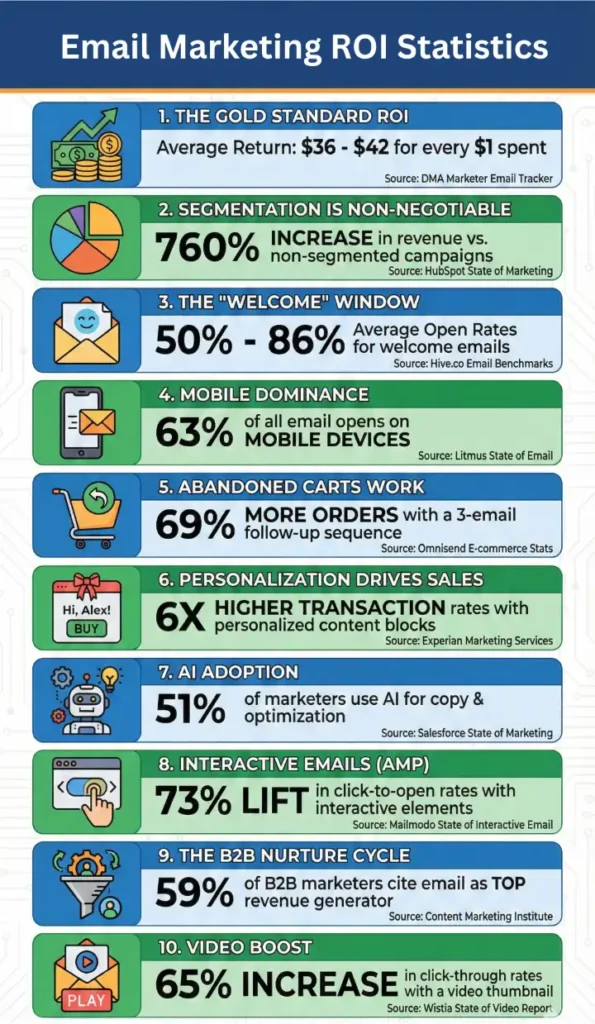
To build a business case for email marketing in 2026, you cannot rely on data from 2018. The landscape has shifted due to AI adoption and privacy changes. Here are 10 verified latest statistics from 2023, 2024, and 2025 that prove email is still the king of retention.
- The Gold Standard ROI: Despite inflation and ad cost increases, email marketing continues to return an average of $36 to $42 for every $1 spent. [Source: DMA Marketer Email Tracker]
- Segmentation is Non-Negotiable: Marketers who use segmented campaigns note as much as a 760% increase in revenue compared to non-segmented, "batch-and-blast" campaigns.[Source: HubSpot State of Marketing]
- The "Welcome" Window: Welcome emails have the highest open rates of any transactional email, averaging 50% to 86% opens. If you aren't selling in your first email, you are wasting your most attentive audience. [Source: Hive.co Email Benchmarks]
- Mobile Dominance: In 2024, mobile devices accounted for 63% of all email opens. If your email template breaks on a vertical screen, you are effectively blocking 60% of your revenue. [Source: Litmus State of Email]
- Abandoned Carts Work: Sending three abandoned cart emails results in 69% more orders than a single email. The money is in the follow-up. [Source: Omnisend E-commerce Stats]
- Personalization drives Sales: Emails with personalized subject lines generate 50% higher open rates, but personalized content (dynamic product blocks) drives 6x higher transaction rates. [Source: Experian Marketing Services]
- AI Adoption: By late 2024, 51% of email marketers were using AI to help brainstorm copy, subject lines, and optimize send times, proving that "hybrid" writing is the new standard. [Source: Salesforce State of Marketing]
- Interactive Emails (AMP): Emails containing interactive elements (image carousels, surveys inside the email) increase click-to-open rates by 73% by reducing friction. [Source: Mailmodo State of Interactive Email]
- The B2B Nurture cycle: In B2B sectors, 59% of marketers cite email as their top channel for revenue generation, beating out organic social and paid search. [Source: Content Marketing Institute B2B Report]
- Video Boost: Simply adding the word "Video" in an email subject line can boost open rates by 19%, and including a video thumbnail can increase click-through rates by 65%. [Source: Wistia State of Video Report]
Check this infographics for better understanding
What to Do Next: Your 24-Hour Action Plan
Stop looking at your ESP's dashboard as the single source of truth. Your Email Service Provider is designed to be a "Cheerleader" (showing you high open rates and revenue claims to keep you subscribed). You need an "Accountant."
If you want to move from "guessing" to "knowing" your ROI, take these three specific actions in the next 24 hours:
1. The "Reality Check" Audit Open Google Analytics 4 (GA4). Go to Reports > Acquisition > Traffic Acquisition. Filter by Session Source/Medium and search for email. Compare that revenue number against what your ESP reports for the same period.
- The Goal: If the discrepancy is less than 20%, you are safe. If it is higher, your tracking tags are broken, or your attribution window is too wide. Fix the tags before you spend another dollar.
2. Calculate Your "True Cost" Open a spreadsheet. Add up your software fees, your freelancer invoices, and—crucially—estimate the internal hours spent fixing data issues.
- The Goal: Calculate your ROI using the Net Email ROI formula we shared in Section 1. This number will likely be lower than you thought, but it will be real.
3. Run the "Dead Weight" Search Go into your email tool. Search for contacts who have not opened an email in 180 days. Look at that number. Multiply it by your "Cost per Contact" rate.
- The Goal: Realize how much budget you are burning on ghosts. Schedule the "Sunset Sequence" for next Tuesday.
Email ROI isn't about hitting a magic number; it's about efficiency. You don't need a bigger list to get a higher return—you usually just need a cleaner one.
FAQ
1. What is a good ROI for email marketing in 2026?
A standard benchmark is roughly $36 to $40 for every $1 spent. However, for high-ticket B2B models, the volume may be lower while the percentage return remains high due to larger deal sizes.
2. How do I calculate ROI if I don't sell products directly online?
You must assign a monetary value to your conversion goals. If a "Demo Request" typically closes at 20% and a deal is worth $1,000, then every Demo Request is worth $200. Use that value in your ROI formula.
3. Does Apple's Mail Privacy Protection affect ROI calculation?
It affects attribution, not the actual bank balance. Because Apple pre-loads images, open rates are inflated. Do not use "Open Rate" to attribute revenue; rely strictly on clicks and UTM tracking.
4. Should I include the cost of my email list software in the calculation?
Yes. To get a "Net" ROI, you must subtract the software subscription, personnel costs, and data maintenance hours from your gross revenue.
5. Why is my Google Analytics revenue lower than my Email Software revenue?
This is usually due to attribution models. Your email software likely uses a generous window (claiming credit for any action), while GA4 often defaults to "Last Click," giving credit to the very last channel the user visited before buying.